TRY IT NOW. NO SIGN-UP REQUIRED.

AI Quiz Maker that turns any prompt or a PDF into a scored quiz in 30 seconds

Create quizzes faster with AI. Just enter a topic and our AI quiz generator will generate questions, answers, and scoring for you.


Peabody
Aramark
Loreal
Toptal
Grab
SFU
World of Hyatt
Iolani School
Austin Independent School District
Virgin

Trusted by 56,000+ Teachers, HR, Marketers, and Trainers

Create quizzes with confidence. Formester is rated highly across leading review platforms for its AI quiz generator, ease of use, and automatic scoring features.


5/55 stars
4.4/54.5 stars
5/55 stars
4.7/54.5 stars

Inputs, question types, and everywhere your quiz goes

What you can feed in, what comes out, and where it can live.

What Formester reads Inputs

A plain text prompt, a list of questions you already have, or a PDF of the source material (up to 100 MB on Free, 1 GB on Personal, 50 GB on Business). Type the topic and let the AI write from there, or upload the chapter, deck, or article you want to test on.

Prompt Question list PDF Up to 50 GB
What the AI generates Question types

Multiple choice, single choice, dropdowns, and true or false (delivered as single-choice with True and False as the two options). Mix question types in a single quiz, weight them differently per question, add negative marking for wrong answers, and turn on answer validation so each wrong pick gets an instant hint or explanation.

Multiple choice Single choice Dropdown True / false Negative marking Answer validation
Where your quiz lives Sharing and embedding

Public link, QR code, and embed snippet out of the box. Email it, post it on a product page, drop it in a training portal, or print the QR onto a handout.

Link QR code Embed Email Print
What you get back Scoring and analytics

Per-quiz score, per-question breakdown, time spent, completion rate, partial-submission recovery, and drop-off by question. Push results into HubSpot, Salesforce, Google Sheets, Slack, Mailchimp, Notion, or any of the 1,000+ apps Formester connects to, or trigger a webhook on every submission.

Auto-score Pass / fail Outcome routing Partial submissions Webhook 1,000+ integrations
Question quality

The model writes the first draft. You ship the final one.

Formester runs on Google Gemini, grounds every question in the content you uploaded, shows you the source passage next to each question during review, flags any answer the model marked correct where the source text is ambiguous, and locks nothing until you click publish. Your uploaded content is not used to train any third-party model. The review workflow is not optional, and that is on purpose.

How to build a quiz in under a minute

Four steps from zero to a quiz you can send.

Bring your content

Paste a prompt like "Algebra basics for grade 9, 10 multiple-choice questions" or upload a PDF of the chapter, training deck, or article you want to test on. Formester reads it and pulls out the facts worth testing.

Pick the shape

Choose how many questions and the format you want (multiple choice, single choice, dropdown, image-based, or video). Scored or outcome, timed or untimed, with answer validation on or off.

Review and edit

The draft lands in the quiz builder. Rewrite the wording, swap a correct answer, add a question the AI missed, change the point values, set a passing score. Nothing ships until you say so.

Share and track

Publish a public link, generate a QR, or embed the quiz on your site. Every submission lands in the dashboard with score, time taken, completion rate, and partial-submission recovery. Push results into HubSpot, Salesforce, Google Sheets, Slack, or any of the 1,000+ apps Formester connects to.

Why teams pick Formester over the ten other AI quiz makers

Generating the quiz is the easy part. The reason you stay is what happens after.

Create Engaging Quizzes Faster

Design fun and interactive quizzes that keep your users engaged using AI, whether they're for learning or entertainment.

Quick and Easy Setup

With our AI-powered outcome quiz maker, you can create quizzes quickly, even if you have no prior experience.

Score it your way

Scored quizzes with pass/fail thresholds, outcome quizzes that route people to a result based on their answers, or a hybrid that does both. Weighted points per question, negative marking for wrong answers, quiz timers, and answer validation that fires an instant hint or explanation when a learner picks wrong. All built in.

Fully Customizable Outcomes

Tailor quiz outcomes based on users' responses, making every quiz unique and relevant.

Edit every question before you ship

AI writes the first draft, not the final one. Reorder questions, rewrite answer choices, change the correct answer, or delete the ones that don't fit. Your quiz, your wording.

Instant Results and Feedback

Get immediate results for your participants. They'll know their scores or outcomes right after finishing the quiz.

Share as a link, QR code, or embed

Every quiz comes with a public link and a QR code, and embeds on any site with a two-line snippet. Put it in an email, a training module, a Slack message, or a product page. Responses land in the same dashboard either way.

Use for Multiple Use Cases

Use quizzes for various purposes, like education, customer feedback, or team training, making your quizzes valuable across different fields.

Who uses the AI quiz maker

AI quiz maker is built for anyone who needs fast, reliable, and professional quizzes without manual work.

an illustration of multi language online forms

Teachers

Upload a chapter PDF or paste your lesson outline, and Formester drafts a graded quiz that maps to what you actually taught. Auto-score it, turn on answer validation so each wrong answer comes with a hint or explanation, and watch the dashboard for the kid who is falling behind in week four, not week fourteen.

an illustration of marketing

Marketers

Lead-magnet quizzes that score the visitor, route them to a result page with their outcome, and drop the qualified lead into HubSpot, Salesforce, or Mailchimp via the integrations Formester ships with. Apply your branding kit so the quiz matches the campaign, split-test the result-page copy, and watch drop-off by question in the analytics view.

an illustration of online rental agreements

HR Teams

Onboarding knowledge checks, annual compliance refreshers, and policy-comprehension tests that prove people read what you sent. Formester tracks attempts, time spent, and passing scores per hire, with conditional-logic branching so a missed question routes the employee back to the right policy doc before they retake.

an illustration of online certificates

Coaches & Trainers

Pre-call diagnostics, personality-style intake quizzes, and progress check-ins. Outcome logic routes each client to a custom result page with their own image, copy, and next step, and responses sync into your CRM so you walk into every session already briefed on what they answered.

AI quiz maker for content creators

Course creators

Generate a diagnostic quiz from a prompt that names the course topic, a module check from each chapter PDF, and a final summary quiz from the whole syllabus. Mix scored and outcome logic so the same quiz grades knowledge and routes students to the next module based on what they got wrong.

AI quiz maker vs the traditional way

When the AI is worth it, and when a drag-and-drop builder still wins.

Task Formester AI Quiz Maker Traditional quiz builder
Time to first question Under 20 seconds from a prompt or PDF 15 to 45 minutes to write 10 questions from scratch
Question writing AI drafts, you edit You write every word
Grading logic Auto-scored, pass/fail thresholds, outcome routing, weighted points, timers Auto-scored, usually with templates
Generate from a PDF source Yes. Upload the chapter or deck. No. You read the source, then type.
Editing control Every question editable before publish Every question editable
Answer validation (instant feedback / hints) Built in Usually a separate config
Best for First drafts, knowledge checks on large content, training at scale Small custom quizzes where every word matters
Honest weakness 5 to 10% of generated questions need rewording Slow when you have a lot of source material

Both live in Formester. Start a quiz with AI, edit by hand, or skip the AI and build from scratch. Same dashboard either way.

What Teachers, Trainers, and Marketers love about Our Quizzes

Limit responses

Set a max number of submissions, a close date, or a passing-score cutoff that hides the quiz after it is met. Useful for timed tests, first-100-respondents lead gen, and waves of training that need to end on a specific day. Learn about form limiter →

formester's form limiter ui

QR code on every quiz

Every published quiz ships with a QR code. Print it on a handout, put it on a slide at the back of the room, drop it in an email footer. The QR links to the same takeable quiz as the share link. Learn more about QR code generator →

formester's qr code generator ui

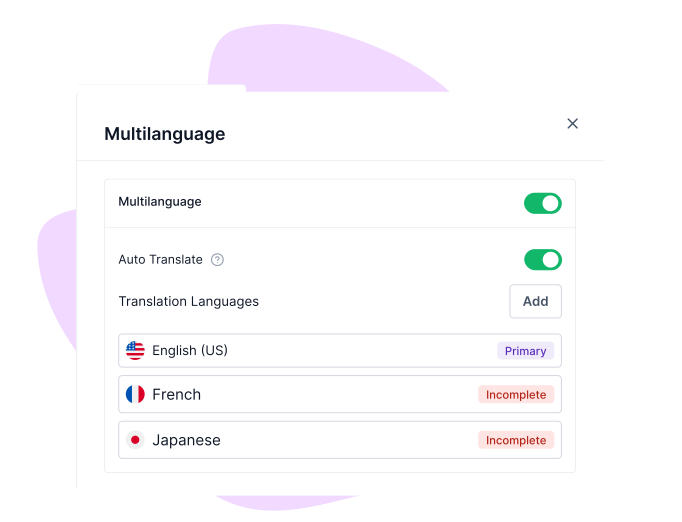
Auto-translate the quiz

enerate a quiz in English, then publish localized versions in additional languages with AI translation, without rewriting the logic. Scores, outcomes, and analytics merge across languages so you're reporting on one quiz, not many. Learn more about Multi-language translations →
a screenshot of formester's multi language translation feature

Offline quizzes that sync without internet

Install the Formester app on a laptop, tablet, or phone and the quiz works without a connection. Responses cache locally, and the moment the device reconnects, every submission syncs into the dashboard automatically. Useful for fieldwork, on-site events, or training rooms with bad wi-fi. Learn more about Offline forms →


an illustration of offline quizzes
For developers and AI agents

Your quiz data, ready for the AI you already use

Connect Claude, ChatGPT, or any AI agent directly to your submissions. Or hit the REST API and pull what you need.

Plug in any AI agent

MCP server for Claude, ChatGPT, and any MCP-compatible model

Claude ChatGPT Custom agents

Formester ships an MCP server that any MCP-compatible model can read in one connection. Ask plain-language questions: "Show me everyone who scored under 60% on this week's onboarding quiz," "Which question did students answer wrong most often?", "Summarize the feedback from yesterday's training submissions." No CSV export, no copy-paste, no glue code.

MCP server guide
REST API v2

Or build directly on the REST API

Self-service token Org-level scope Business plan and up

Organization-level scope, self-service token in two clicks at app.formester.com/api, and full read access to forms and submissions. v1 is still around for legacy form-level integrations, but new builds should start on v2.

API documentation
Privacy and data ownership

Your content is not used to train anyone's AI. Yours, ours, or theirs.

When you upload a PDF, paste a prompt, or generate a quiz, that content is used to generate your quiz and nothing else. Per Section 4.4 of our DPA, Formester does not use Customer Data for analytics, advertising, marketing, or product training. The Google Gemini integration we use to power AI features inherits the same boundary.

Encrypted in transit and at rest, hosted on Heroku and AWS, automated encrypted backups with a 90-day retention, and full data deletion on request. We are GDPR, UK GDPR, and CCPA compliant. We are not SOC 2 or ISO 27001 certified yet, and we will tell you so directly rather than dance around it.

Quote icon

USER TESTIMONIALS

Testimonials

Quotation marks

Formester is really easy to use and an exceptional alternative for Typeform. We use it for call for papers, lead registrations, feedback and surveys and it cannot be simpler.

photo of jilson
JilsonOrganiser at Vue Conference
Quotation marks

Tried like 4 quiz tools for our lead gen funnel before this and honestly this is the only one I didn't end up hating. AI did most of the work and the customization actually works.

a photo of Alex
AlexCustomer Success Manager at Orion Growth Partners
Quotation marks

Very intuitive and the surveys look genuinely professional out of the box. Most importantly, I requested a custom rating scale and they shipped it within hours. Stellar support that is hands-down better than the Jotform.

a photo of Chris
ChrisOperations Lead at SummitCloud Software
Quotation marks

Formester is simple enough for non-developers and sophisticated enough for developers. I'd say being able to choose between simplicity and complexity is one of this product's strengths. In addition, the founder is available to answer questions and doubts, which does not happen every day.

a photo of costanza casullo
Costanza CasulloVolunteer at Wato Coding Hub
Quotation marks

I'm migrating my forms from Paperform, where I've been a user for over 4 years. Loving the software so far! I've already replaced Paperform form embeds & popups on my sites & my husband's websites with Formester forms

a photo of dr michele
Dr. Michele RossFounder at Infused Health
Quotation marks

Formester AI form builder has lots of customisation options. It's very easy to generate online forms. Forms generated are also very user friendly it supports both mobile and desktop version. It also allows us to build our own custom themes. File upload is also possible in surveys. I love the simplicity with which I can create forms within couple of minutes without any coding knowledge. The UI is very attractive and easy to use. No prior experience is required to use it.

Deepika K - Formester Happy User
Deepika KBusiness Development Executive at

Generate your first quiz. Free, no credit card.

Or try the generator above first, no sign-up needed.

FAQs About AI Quiz Generator

Yes. AI quiz generation and quiz building are on every plan, including the Free plan at $0/month. Free includes 10 forms, 100 responses per month, all field types, quiz auto-scoring, drop-off analysis, and payment collection. Free-plan quizzes show Formester branding (removed on Personal at $13/month). API access starts on the Business plan. Full breakdown on the pricing page.

An outcome quiz gives personalized results based on user answers. It helps users get tailored recommendations or insights instead of just a score.

A scored quiz assigns points to answers and shows a final score at the end. It is useful for tests, assessments, and knowledge checks.

Paste a prompt that names the topic ("Algebra basics for grade 9, 10 questions") or upload a PDF of the chapter, deck, or article you want to test on. Formester reads the source, pulls out the facts worth testing, and drafts questions with answer choices, the correct answer, and optional explanations. You then review, edit, and publish. Nothing goes live without your sign-off.

Yes. You can set scoring rules, adjust points, and customize outcomes based on user responses to match your goal.

Yes. You can modify questions, answers, scoring, design, and logic anytime before or after publishing.

You can create scored quizzes, outcome-based quizzes, personality quizzes, assessments, and feedback quizzes for any use.

Three options ship with every quiz: a public link you can send anywhere, a QR code for handouts or in-person sessions, and an embed snippet that drops the quiz into any webpage. Responses land in the same dashboard whichever channel they came through.

Yes. All quizzes are mobile-friendly and work smoothly on desktop, tablet, and phone.

A short prompt, a list of questions you already have, or a PDF of the source material. Type the topic and let the AI write the questions, paste in your own list and let it format and score them, or upload the document you want the quiz to be built from.

Multiple choice, single choice, dropdowns, image-based questions, and video questions. A single quiz can mix any of them, and each question can carry its own point value, a correct-answer explanation that fires through answer validation, and a place in a timed or untimed section.

Yes. Each question lands in the editor with the source passage next to it. Rewrite the wording, swap the correct answer, add distractors, delete the question, or add one the AI missed. The review step is the default step; you do not have to click around to find it.

Use a scored quiz when you care about right and wrong — training checks, employee certifications, classroom tests. Use an outcome quiz when the goal is to route the taker to a result based on their answers — lead magnets, personality tests, product recommenders. Formester lets you combine both in one quiz if you want, so a marketing quiz can score the lead and route them to the right offer at the same time.

Per-question point values, weighted categories, pass/fail thresholds, quiz timers, and conditional branching based on score or specific answers. Outcome routing lets you map any combination of answers to a custom result page with its own copy, image, and CTA. Answer validation can show an instant hint or explanation when a learner picks the wrong answer.

Yes. Every quiz is responsive by default, and quiz takers can finish on phone, tablet, or desktop. Offline mode captures responses on flaky wi-fi and syncs when the device reconnects.

Published research (BMC Medical Education, 2025) shows that AI-generated multiple-choice questions hit a decent discrimination bar roughly 38% of the time on the first draft, and around 6% carry a factual error. That is why Formester grounds every question in the content you uploaded, shows the source passage next to the question during review, and ships nothing until you click publish.

No. Per Section 4.4 of our Data Processing Agreement, Formester does not use Customer Data for analytics, advertising, marketing, or product training. The same boundary applies to the Google Gemini integration that powers our AI features. Your uploaded PDFs, prompts, and quiz responses stay on your account, encrypted in transit and at rest, with full deletion available on request. Read the DPA and the security overview.

es. Formester ships an MCP server (Model Context Protocol) that any MCP-compatible AI agent Claude, ChatGPT, custom agents can read in one connection. Ask plain-language questions like "Which students scored under 60% this week?" or "Show me everyone who got Q4 wrong," directly from your AI assistant. There's also a public REST API (v2) with a self-service token for direct integration. See the API docs and the MCP server guide.