TRY IT NOW. NO SIGN-UP REQUIRED.

Free AI Form Generator: Turn Prompt, PDF, URL or Image into Form

Build any form within seconds with our free AI form generator. Turn a prompt, PDF, image, or URL into a live, fillable form in under 30 seconds. No sign-up required

Peabody
Aramark
Loreal
Toptal
Grab
SFU
World of Hyatt
Iolani School
Austin Independent School District
Virgin

Trusted by 56,000+ businesses, educators, and marketers worldwide.

Formester is a powerful AI form generator that helps you create surveys, quizzes, registration forms, and lead capture forms in seconds. No coding required. Just describe your needs and let our AI form builder do the work.

5/55 stars
4.4/54.5 stars
5/55 stars
4.7/54.5 stars

Generate forms from a prompt, PDF, or question list.

Start with whatever you already have. The AI Form Generator accepts three input sources.

From a prompt

Describe what you need in plain English. Best for original forms where you know the goal but have not written the questions yet. Example: "Build a 7-question post-event feedback survey with rating scales and one open-ended question."

From a PDF

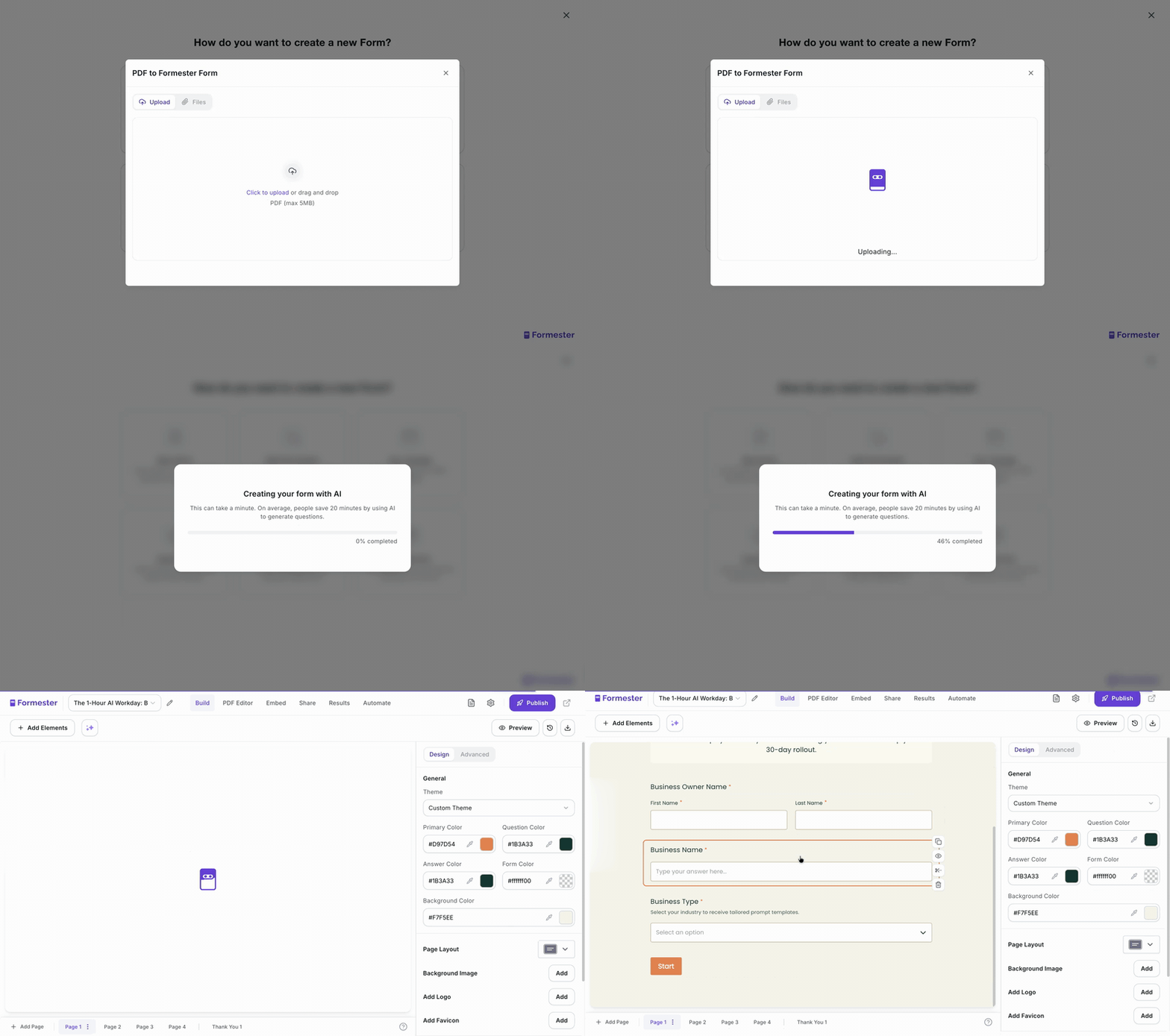
Upload a non-fillable PDF. We detect the fields, recreate them as interactive inputs, and publish a fillable online version. Great for paper forms your organization already uses (registration sheets, intake forms, compliance checklists).

From a question list

Paste a list of questions you have already written, from a doc, a spreadsheet, or a brief. The generator picks the right field type for each one (multiple choice, rating, open-ended, file upload), groups related questions, and structures them into a working form.

Quality control

Forms that ship with the right field type already chosen, not as a starting point you have to fix.

When the AI drafts a form, it picks the right field type for each question. "What's your email?" gets email validation. "How would you rate us?" gets a 1 to 5 rating scale. "Pick the closest match" gets multiple choice. "When can we follow up?" gets a date picker. These are the small calls a form designer normally makes manually for every field.

Every draft lands in the Formester editor, never as a frozen output. Change a field type, add validation, make a question conditional, group related fields, or rewrite the labels. The AI handles the obvious 80%; the editor is where the last 20% gets human judgment.

How Our AI Form Builder Works

Start from a prompt, PDF, image, or URL. Our AI form generator turns it into a shareable form in 30 seconds.

Step 1

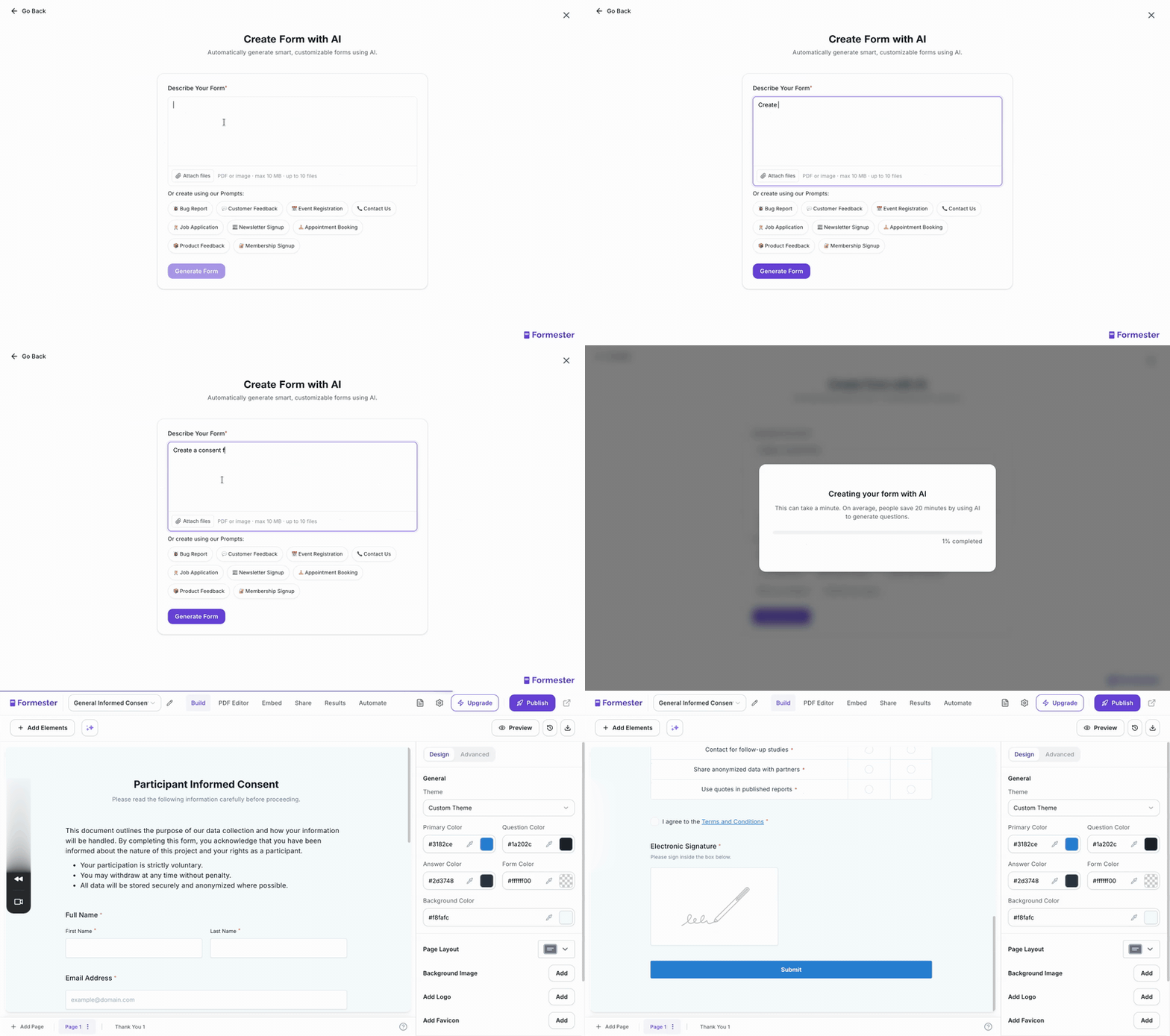
Type a prompt, paste text, or upload a PDF

Describe what you need in plain English. Paste a block of text you want turned into questions. Or upload a PDF or Image and watch it become a fillable form

Describe your Form
Step 2

Watch your form build, field by field.

The AI picks the right question types (short answer, multiple choice, rating scale, file upload) and sets up the conditional logic for you.

Watch it build
Step 3

Edit with AI, then share

Tweak the wording, add your branding, connect your tools, and publish. Share the link, embed the form, or push it straight into your CRM

ai form editor

Who uses our Powerful AI form generator

Teams turning prompts into live forms every week

Marketers

Ideal for lead capture, event registration, and customer feedback. Build a campaign-specific form in the time it takes to write the brief.

HR teams

Ideal for job applications, onboarding surveys, and 360° feedback forms.

Teachers

Ideal for quizzes, assignments, and student feedback surveys. Auto-generate assessments aligned to your curriculum in seconds with our AI Quiz Maker.


Generate Quizzes in Seconds →

Trainers and coaches

Ideal for training needs assessments, skill-gap diagnostics, and post-session feedback. Turn a syllabus into a pre-assessment in one prompt.

Founders

Ideal for customer interviews, product feedback, and churn surveys. See how other founders use AI to analyze customer feedback faster.


Analyze Customer Feedback →

Researchers

Ideal for survey instruments, consent forms, and participant screening. Pair it with our AI Survey Generator for research-grade question design.


Generate Surveys with AI in Seconds →

Event organizers

Ideal for event registration, speaker submissions, and post-event feedback.

Nonprofits

Ideal for volunteer signups, donor intake, and grant applications. Generate compliance-ready forms from a funding-requirement PDF in seconds.

For developers

Your form data, ready for the AI you already use.

Every Formester form ships with a REST API and an MCP server, so submissions don't stop at a CSV. Pipe leads into your agent. Stream applications into your hiring copilot. Nobody else on this list ships MCP.

MCP server

Plug Formester into Claude, ChatGPT, or any MCP-compatible model.

Claude ChatGPT Custom agents

Connect Formester to any MCP-compatible model and let it read your form submissions directly. Ask Claude "which leads from this week's webinar form look highest-fit?", or have a custom agent score job applications against the role brief and flag the top candidates for the recruiter.

Read the MCP docs →
REST API v2

Or build directly on the REST API.

Self-service token Webhooks Business plan +

Pull form submissions into your data warehouse, push pre-filled form URLs back from your CRM, or build a custom enrichment pipeline. Self-service token at app.formester.com/api in two clicks. No support ticket, no waiting.

Read the API docs →

Formester vs Traditional AI Form Builder

Tradition AI Form Builder
Formester AI Form Builder
Time to first form
15 to 60 minutes
Under 30 seconds
Starting point
Blank Canvas
Prompt or PDF
Question suggestions
None
Auto-generated from the prompt
Field type selection
Manual
Auto-detected from intent
Conditional logic
Manual setup
Auto-applied
Skills required
Form-designing
Describe it in one sentence
Ongoing updates
Manual
Edit with a new prompt
Privacy and data ownership

Your content is not used to train anyone's AI. Yours, ours, or theirs.

When you upload a PDF, paste a prompt, or generate a form, that content is used to generate your form and nothing else. Per Section 4.4 of our DPA, Formester does not use Customer Data for analytics, advertising, marketing, or product training. The Google Gemini integration we use to power AI features inherits the same boundary.

Encrypted in transit and at rest, hosted on Heroku and AWS, automated encrypted backups with a 90-day retention, and full data deletion on request. We are GDPR, UK GDPR, and CCPA compliant. We are not SOC 2 or ISO 27001 certified yet, and we will tell you so directly rather than dance around it.

Unlock the full power of AI

a screenshot of formester's ai quiz maker

AI quiz maker

Build scored quizzes and outcome-based flows in seconds. Great for lead gen, education, or fun user engagement.

Learn more-->

a screenshot of create conditional logic with ai ui

AI conditional logic forms

Show or hide questions based on answers. Let AI build custom paths for each user without any setup.

Learn more-->

a screenshot of formester translate with ai feature

AI auto translation

Translate your form into 80 plus languages instantly. Reach users in their native language with no manual work.

Learn more-->

a screenshot of formester ai quiz maker

AI test creator

Create skill based tests in seconds. Let AI generate questions, scores, and feedback with zero manual effort.

Learn more-->

a screenshot of formester's ai survey generator

AI survey generator

Generate full surveys with smart questions. Discover insights faster and make better data backed decisions.

Learn more-->

a screenshot of formester's summary analytics

AI poll maker

Create quick, engaging polls with smart AI generated questions. Get instant responses and clear summaries that guide smarter decisions.

Learn more-->

Quote icon

USER TESTIMONIALS

What Users Feel about Formester

Quotation marks

Tried like 4 quiz tools for our lead gen funnel before this and honestly this is the only one I didn't end up hating. AI did most of the work and the customization actually works.

a photo of Alex
AlexCustomer Success Manager at Orion Growth Partners
Quotation marks

Formester is simple enough for non-developers and sophisticated enough for developers. I'd say being able to choose between simplicity and complexity is one of this product's strengths. In addition, the founder is available to answer questions and doubts, which does not happen every day.

a photo of costanza casullo
Costanza CasulloVolunteer at Wato Coding Hub
Quotation marks

Very intuitive and the surveys look genuinely professional out of the box. Most importantly, I requested a custom rating scale and they shipped it within hours. Stellar support that is hands-down better than the Jotform.

a photo of Chris
ChrisOperations Lead at SummitCloud Software
Quotation marks

I'm migrating my forms from Paperform, where I've been a user for over 4 years. Loving the software so far! I've already replaced Paperform form embeds & popups on my sites & my husband's websites with Formester forms

a photo of dr michele
Dr. Michele RossFounder at Infused Health
Quotation marks

Formester AI form builder has lots of customisation options. It's very easy to generate online forms. Forms generated are also very user friendly it supports both mobile and desktop version. It also allows us to build our own custom themes. File upload is also possible in surveys. I love the simplicity with which I can create forms within couple of minutes without any coding knowledge. The UI is very attractive and easy to use. No prior experience is required to use it.

Deepika K - Formester Happy User
Deepika KBusiness Development Executive at

Ready to build your perfect form?

Get access to advanced AI, unlimited forms & more. See pricing for more details.

FAQs

An AI form generator turns a plain-English description, a PDF, an image, or a block of text into a structured, fillable form. Instead of dragging fields onto a canvas, you describe the form you need ("a job application form for a frontend developer with resume upload and a LinkedIn field") and the AI builds the questions, picks the field types, and sets up the conditional logic for you.

The AI Form Generator analyzes the details you provide about your form and adds all the necessary fields to create the form, quiz or survey you’ve described. You can then make changes and adjust the form to fit your needs.

Yes. Formester AI Form Generator is free to use. No credit card required to sign up, and you can generate and publish forms on the free plan. Paid plans unlock custom branding, advanced integrations, and higher response limits.

Absolutely. The AI Form Generator is designed to be user-friendly, guiding you through the process of creating forms with minimal effort.

Yes, you can make changes to the AI-generated forms, including adjusting fields, layouts, and designs to meet your specific requirements.

ChatGPT can draft form questions and field labels, but it cannot host a live, fillable form you can share with respondents, collect answers in, or connect to your CRM. An AI form generator like Formester does both halves. It generates the questions and deploys them as a live form at a shareable URL with a backend that stores responses.

Yes. Upload a non-fillable PDF, for example a scanned tax form or a printable registration sheet, and Formester's AI detects the fields, recreates them as interactive inputs, and publishes the result as a fillable online form. No manual rebuilding.

Tools built specifically for AI form generation include Formester, Jotform, Fillout, Makeform, Weavely, and Typeform. General-purpose assistants like ChatGPT and Gemini can suggest form content but do not publish live forms. When choosing, look for free generation without sign-up, support for multiple input sources (prompt, PDF, image, URL), and a direct connection to your CRM and automation tools.

Formester's AI generates the form. Filling it out is a separate workflow. If your goal is to auto-populate a form from source data (for example, auto-filling a shipping address from a CRM record), you can connect Formester to your CRM via our integrations. For respondent-facing forms, the person completing the form enters their own answers.